Frontend System Design Framework

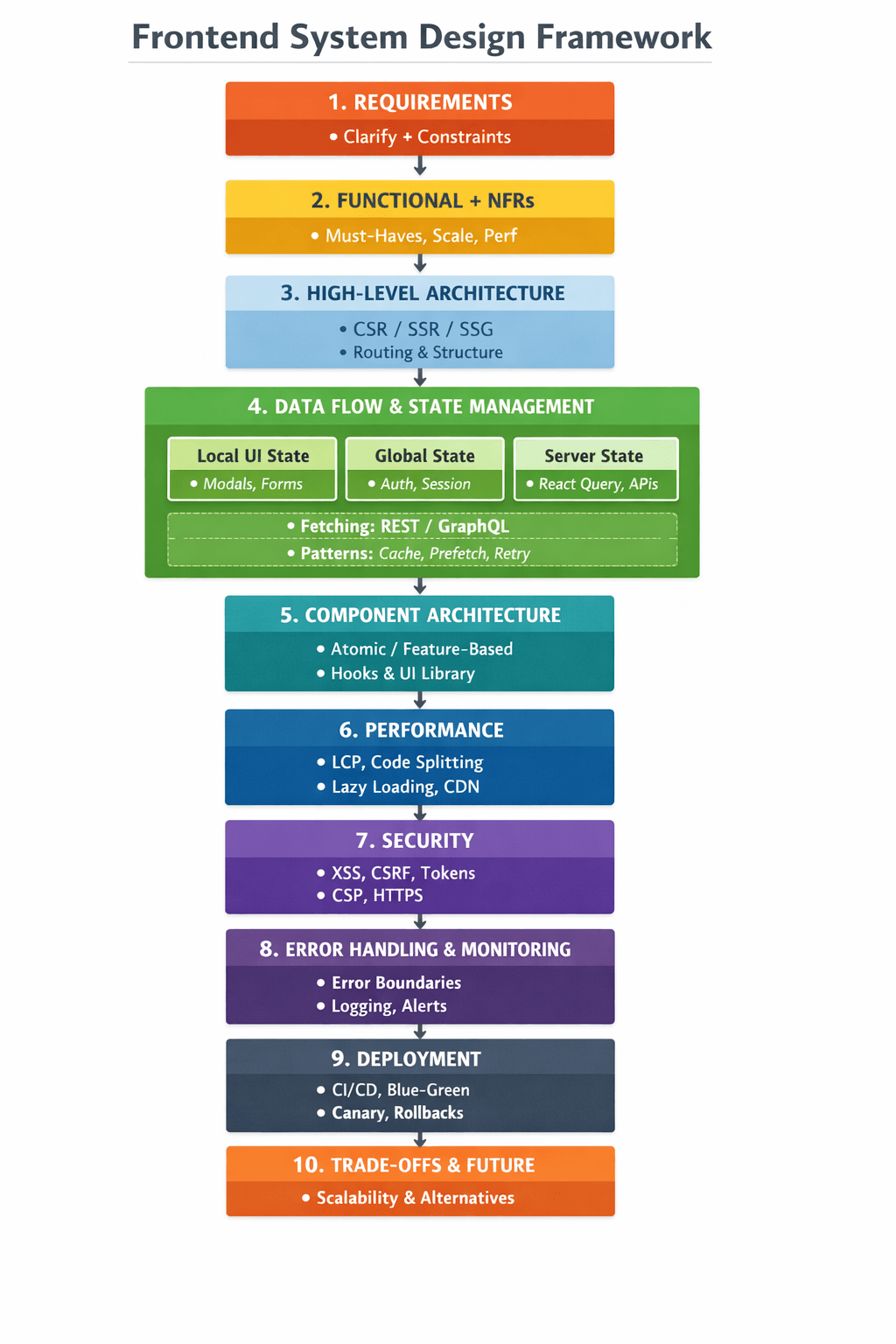
- Clarify requirements
- Architecture → CSR/SSR/SSG/Hydration
- Data layer → APIs, caching, state mgmt
- Component design → reusable UI, hooks
- Performance → LCP, Code-split, Prefetch
- Scalability → modular, typed, design system
- Security → XSS, CSRF, token strategy
- Observability → Sentry, logs, errors
- Deployment → CI/CD, zero downtime
- Trade-offs & alternatives
Here is a clean, structured, rggeady-to-speak template you can literally recite in any frontend system design interview.
It's designed to sound senior, organized, and fast.
✅ FRONTEND SYSTEM DESIGN — READY-TO-SPEAK TEMPLATE
Use this exact flow.
Just replace the problem name (e.g., Dashboard, Chat App, Checkout).
1. Clarify the Requirements
"Before I dive into the design, I want to clarify the requirements to make sure the solution fits the use case."
- Who are the users?
- What are the core features?
- Any constraints — SEO, performance, offline mode, accessibility?
- Expected scale — number of users, expected QPS?
- Any specific tech stack constraints — React, Next.js, SPA, SSR?
2. Summarize the Functional Requirements
"Let me restate the requirements so we’re aligned."
- Primary features
- Secondary features
- Non-functional requirements
- performance
- SEO
- security
- reliability
- accessibility
3. High-Level Architecture
"At a high level, I’d structure the frontend like this:"
- Rendering strategy → CSR / SSR / SSG / hybrid (Next.js)
- Project structure → feature-based architecture
- Core layers:
- UI layer (React components)
- State management layer (React Query/Redux/Zustand)
- Data fetching layer (API services)
- Caching / persistence layer
- Error & logging layer
- Routing
"Frontend interacts with backend using REST/GraphQL through a typed API layer."
4. Data Flow + State Management
"I’ll break the state down into UI state, global state, and server state."
- Local UI state → controlled components, modals, toggles
- Global state → auth, theme, user session
- Server state → fetched, cached, invalidated via React Query/SWR
- Optimizations:
- Stale-while-revalidate
- Prefetching
- Infinite scroll or pagination
- Debounced/throttled requests
- Optimistic updates where applicable
"All data fetching is centralized in a service layer with proper error handling and retry mechanisms."
5. Component Architecture (LLD)
"For the component architecture, I’ll follow a modular, reusable, predictable structure."
- Feature-based folder structure
- Reusable shared UI components
- Custom hooks for logic
- Separation of responsibilities (UI vs logic)
- Accessibility-first components
- Code splitting per route or feature
6. Performance Strategy
"Performance is a major priority, so I’d focus on:"
Initial Load
- Code splitting
- Lazy loading heavy routes
- Preloading critical data
- Optimizing images
- Using CDN + caching layers
Runtime
- Memoizing expensive UI
- Preventing unnecessary re-renders
- Using virtualization for large lists
- Prefetching user interaction-based actions
Metrics
- LCP / FCP / CLS
- Lighthouse or Web Vitals
7. Security
"From a frontend perspective, security focuses on preventing common vulnerabilities."
- XSS prevention (sanitize input, avoid innerHTML)
- CSRF protection (tokens, same-site cookies)
- Secure token handling (short-lived access tokens, refresh tokens)
- HTTPS always
- CSP headers
- Avoid exposing secrets in frontend code
8. Error Handling + Observability
"For stability and debugging:"
- Global error boundary
- Centralized API error handler
- Retry with exponential backoff
- User-friendly fallback UI
- Logging/monitoring tools (Sentry/LogRocket)
- Tracing slow React components
- Session replay for debugging
9. Deployment + Zero Downtime
"For deployment scalability and availability:"
- CI/CD pipeline (GitHub Actions, Vercel, CloudFront)
- Blue–green or canary deployments
- Cache invalidation strategies
- Feature flag-based rollout
- Environment-specific configs
- Rollback support
10. Trade-offs & Future Enhancements
End very strong:
"Finally, here are the trade-offs and considerations:"
- Why I chose SSR/CSR
- Why a particular state management option
- What changes for:
- 10× more users
- offline-first mode
- low bandwidth users
- heavy SEO requirements